
How to Build a Marketing Reporting System
Marketing shouldn’t leave you wondering where your money went. With clear goals, reliable tracking, and AI to help make sense of the numbers, builders can make smarter decisions, focus on what’s working, and build confidence in their marketing investment.
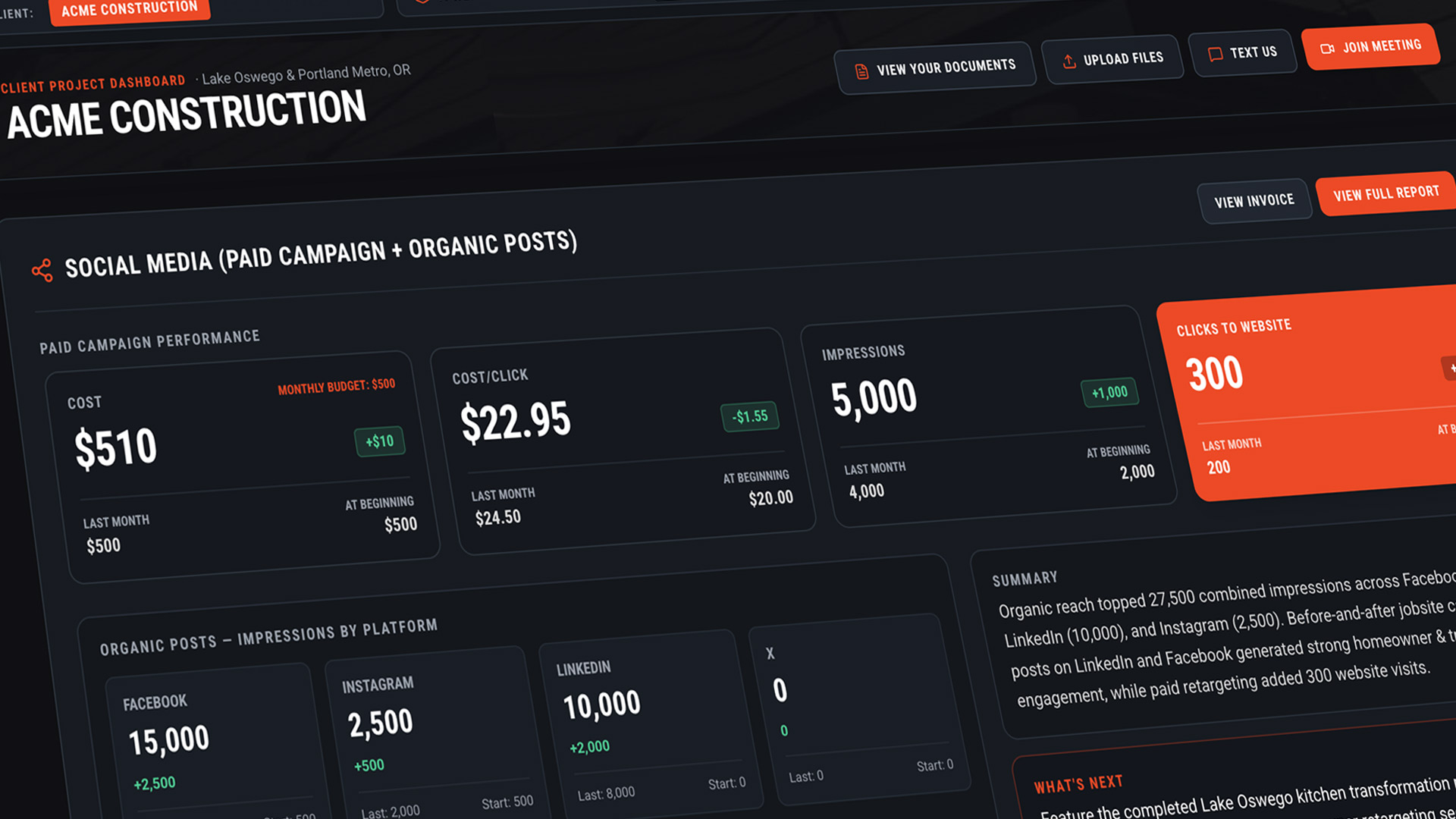
Track your efforts on a dashboard so your marketing doesn’t leave you guessing.
You wouldn’t run your building project without some kind of system to monitor the numbers. If you want it to be successful, you need to constantly know whether or not you're still within budget, if you’re sticking to your schedule and if everything is moving along like it should be.
Your marketing deserves the same oversight. There may be long stretches of time when the phone’s not ringing, but that doesn’t necessarily mean your marketing isn’t working. Prospects are still visiting your website. They’re reading your articles and reviewing your project examples. You just need to look under the hood to get a better understanding of what’s happening behind the scenes.
There are many reporting systems available to you right now. Some are free, some take investment, most are cumbersome and confusing. But the goal of each is to help you review in real time who’s looking for you, what they’re interested in learning about you, and also where they may be getting stuck and falling away.
This is real information you can use to stay organized and make adjustments so your marketing can gain some real traction. If you can learn to compile data into your own reporting dashboard, it can keep you encouraged to not to pull the plug too early and stick with your plan.
Start with the outcome
Before setting up a reporting system, decide what you want a potential customer to do. Sure you hope they click on your phone number, but would another signal of intent be an inquiry about a project, estimate request, or a view of a demonstration video?
These actions are called conversions, because it shows a casual website visitor has “converted” into a prospective customer. Conversions give your reporting system a real goal to work with.
Build your website around one path
Google just introduced a new feature called AI Max. When it's enabled, Google can send an ad visitor to a page on your website that it considers more relevant to the search, based not just on keywords but the user’s search history, preferences, and intentions.
This means that while campaign-themed landing pages are still valuable, every main page on your site - from your services to your resources, case studies, even your About Us page - now needs to be set up with the expectation that your visitors may land there instead.
Your home page is no longer the front door to your site. Treat every page like its now your home page as well as your deal closer page. Give visitors useful information, relevant examples, and an obvious next step.
Google Analytics
Google Analytics gives you the readouts of traffic moving through your website. You can see which pages people visit, where they come from, and how they interact with your content. That helps you understand which parts of the site attract interest and contribute to inquiries.
Start by confirming that Analytics is installed, and gain access to it. Use it to detect areas that need improvement. If your services pages are getting little action while a non-essential page is getting high traffic, this gives you insights on what you need to adjust so your visitors are seeing the right information.
Google Tag Manager
Google Tag Manager helps manage the tracking instructions that send information to Analytics and advertising platforms. It can be configured to track actions such as successful form submissions or phone-number clicks.
Be specific about what those actions prove. Clicking “Contact Us” may show interest but clicking on the “Submit” button of your contact form signals the lead you’re hoping for. Counting every button click as a new lead can make a campaign look successful while leaving you wondering where the customers are.
Have somebody test the setup and check it periodically, especially if you adjust your website from time to time. Your reporting system is only useful when the numbers represent what you think they represent.
Google Search Console
Google Search Console helps you understand how your website appears in Google’s unpaid search results. It shows the searches that bring up your pages, how often people click, and technical issues that may affect your visibility. Analytics then helps you understand what visitors do after arriving at your site.
Suppose you’re appearing more often for searches about commercial renovations, but few people click. That may be a reason to improve how the page is presented in search results. If people click through but rarely inquire, look more closely at the page itself and whether it answers their needs.
Google Ads
Your Google Ads reports let you review what your prospective audeinces are searching for, where they’re looking, and how many times they find your site. Use that data to optmize your campaigns: edit out the stuff that’s not hitting and double down on the search terms that they like. This helps you hone in on the most qualified inquieries and get the best return on your ad spend.
Social media and your Google Business Profile
Facebook, Instagram, LinkedIn, and YouTube all provide reporting, and all can bury you in numbers. Choose the measurements from social media that match the campaign’s purpose.
Use tagged links to help identify campaign traffic in Analytics, and configure conversion tracking where appropriate. Compare platform reports with actual inquiries because different platforms may claim credit for the same person.
Your Google Business Profile belongs here, too, particularly if you serve a local market. Keep the information current, add relevant photos, and review the available performance data. A tagged website link can help you identify visits from the profile and see how it contributes alongside your other efforts.
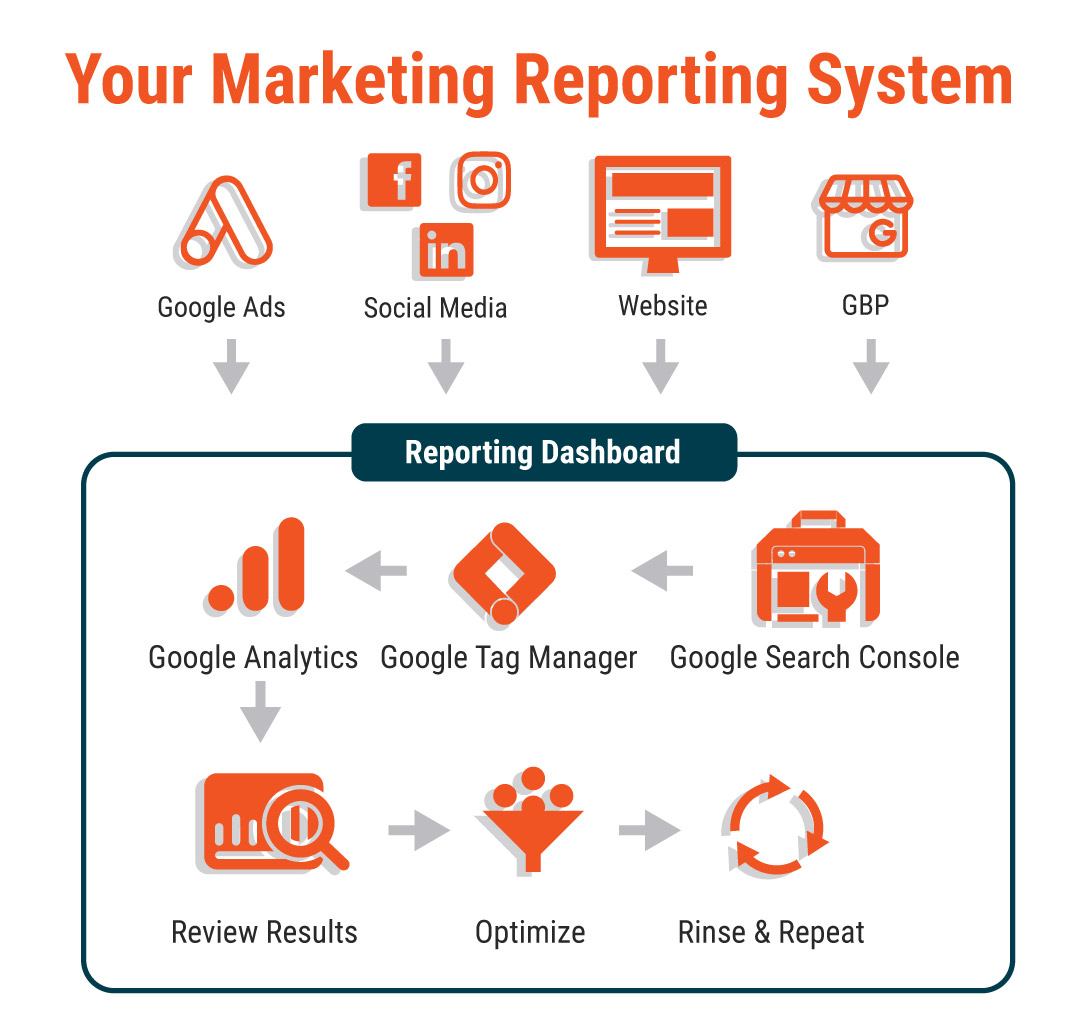
Bring it into one dashboard
By now, you might be thinking, that’s an awful lot of accounts to keep track of, which is why you need to invest in or have AI build you a reporting dashboard.
Your dashboard should quickly answer a few practical questions: Are more relevant prospects finding us? Which channels produce qualified inquiries? What are we spending to generate them? Are those inquiries becoming real opportunities? Show the current results alongside previous periods so you can see direction and progress.
Tools such as Ahrefs and Semrush can add research about keywords, search visibility, and competitors. A CRM, such as HubSpot, can help track inquiries through your sales process. Choose these tools around a specific need. A simple, consistently maintained lead record is a useful starting point, and you can expand as the business requires it.
Put AI to work
AI can make this system easier to use by reviewing reports, flagging changes, and preparing recommendations. Depending on the platform, you can work with built-in AI features or connect an assistant to approved data sources. You can also begin with exported reports before investing in a more automated setup.
An AI-built dashboard can follow a recurring workflow: gather the information, compare results, and prepare a summary. Somebody still needs to establish the connections and verify the information. AI can help interpret your records, but it needs accurate records to work from.
Tell it which projects you want, where you work, and what qualifies as a good lead. Ask it to identify missing information and acknowledge when there isn’t enough data for a confident recommendation. That keeps the analysis useful and gives you something concrete to discuss with your marketing partner.
Over time, routine reporting and certain adjustments can be automated within agreed limits. Keep oversight of significant spending decisions and changes in direction. The system can handle more of the recurring work while you focus on the decisions that need your knowledge of the business.
Keep the system improving
Set a rhythm you can maintain. That’s how your marketing becomes stronger month after month. The reporting comes in, AI helps sort through it, and you use the findings to refine the work. As the information improves, the recommendations can become more useful. As you act on them, you learn more about reaching the customers you want.
Buying decisions in this industry take time. A quiet phone today doesn’t tell you everything about the work your marketing is doing, and it certainkly shouldn’t dictate that you should panic and shut it down. Experience tells me you’ve worked too hard to make decisions about your company’s future with a shrug and a guess.
Your dashboard can reveal growing search visibility, more visits to important service pages, and the first qualified inquiries. You’ll have a clearer view of where your money goes and a better reason to keep investing when progress takes patience. Every review gives you a chance to sharpen your approach and reach more of the people who need what you build.

Written by Rusty George, a certified and overworked human. AI offered plenty of suggestions but was politely ignored for the most part.
Rusty George leads a branding, website design and marketing agency serving construction companies, developers, subcontractors, manufacturers, material fabricators and suppliers. Reach out anytime to get a demonstration of our reporting dashboard we built, and discuss how we can build one for you!
MORE Insights
Unlock the secrets to transforming your construction company into a marketing powerhouse with Louder Builder.

How Much Should a Builder Spend on Advertising?

Your Online Visibility Machine
SIGN UP FOR UPDATES
We will send you our latest insights from Louder Builder as they are released.
CONTACT US
Are you ready to begin your project today? Just have a few questions?
Either way, let’s talk.